|
The original
concept
The original concept, believe
it or not, was to be a device to open and close my
curtains at specific times. This was abandoned on
two points, firstly it seemed rather uninspired and secondly I
don't have
curtains (I have a
shutter).
Evolution
The
curtain opener used a stepper motor, and sensors. It didn't
seem beyond the realms of possibility to add another motor and
suddenly the motors can be rear wheels of a little 'bot. That
is where Amélie rests today.
The
future?
Because of the "open spec"
design, Amélie can lend herself to many other
applications, such as:
I say
"smart" in each case as the potential is limited only by the
ROM space (4K is loads though) and your imagination.
These sorts of ideas are further discussed in the possibilities document.
What
exactly is
Amélie?
Amélie is an
"embedded" system based upon an NMOS 6502
processor, a VIA, an ACIA, 2K RAM and 4K
EPROM. She is not designed to be
a "computer" in the general sense, but rather is intended to
be applied to a specific task.
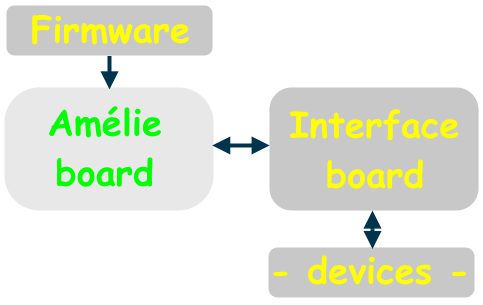
The I/O is provided within
Amélie but the interface (stepper motor driver, relay
driver, etc) is provided on a separate piece of veroboard so
that the same base (i.e. Amélie) can be applied to
numerous applications with no more than a change of interface
board and new firmware.
You can see the way everything fits
together in this diagram:
Why
"Amélie"?
It is due
to a habit - all of my computers have girl's names beginning
with the letter "A". My original Acorn A3000 is called
Anna (the other one is Amy). The A310 is
Arabella. The later A5000 is Angela. The
RiscPC is Alyson, and the laptop PC upon which I
am writing this is called Angelique.
Therefore, it
sorta makes sense that Amélie be called
Amélie.
And before
you ask if it has any connection to the Jean-Pierre Junet
film... yes. It does.
(otherwise I suspect this would have
been called Auralie)
Somebody emailed me to ask how I do the 'é' character.
Under Windows, on my keyboard
layout I can press
Ctrl-Alt-e
to get this character. Failing that, hold ALT
and tap 0 2 3 3 on the numeric keypad.
On
RISC OS, hold ALT and tap
'[', then press
'e'.
The original
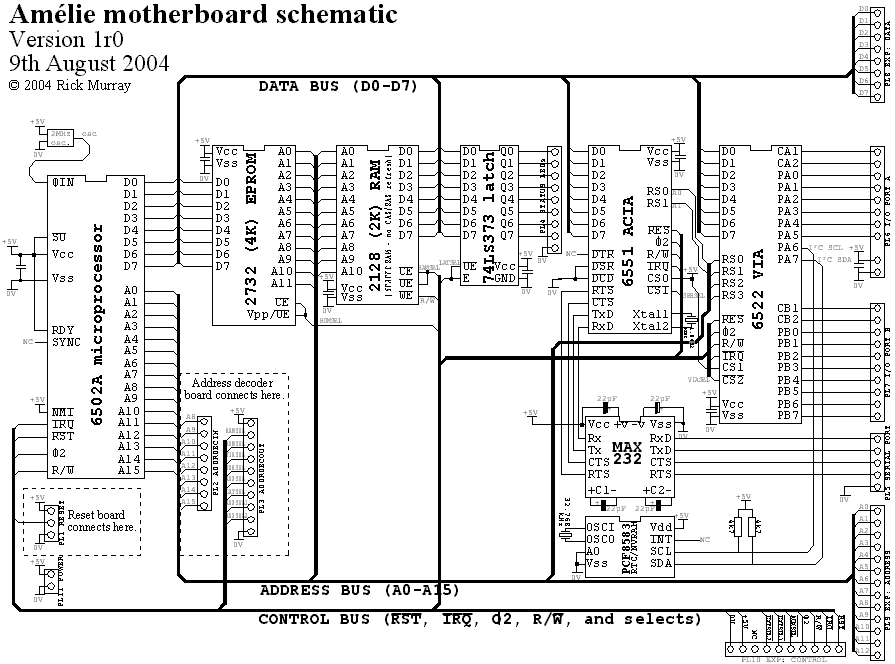
schematic
The original
'working concept' schematic was drawn onto a piece of paper,
and then recreated line by line in !DrawPlus (yes, it took a while!).
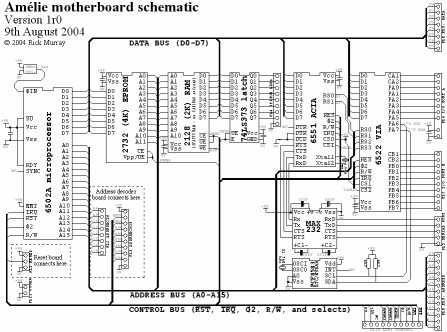
Click on the picture to look at a
larger
version (895x664, 25K), or you can look at a really
big version (1814x1326, 55K).
Can you spot the "deliberate error"? (that's my excuse :-)
).
Veroboard design
The
first version of Amélie is designed to be built onto
a piece of veroboard (stripboard).This isn't the best
solution, given the number of data/address/control lines, but
it is the cheapest and simplest system.
Customised
circuitry
The second version of
Amélie is designed on a compact PCB. ExpressPCB offers a
service to make three identical miniboards at an
attractive price, and this is the service that I have opted
for. The cost, to make the boards and ship to France, is $85
USD. The board is a little tight due to the size and the
limitation of 300 'holes', but it is not difficult to
build.
This option is more expansive, but is much tidier
and fits Amélie into a much smaller space.
Diary
June 2004
Began
thinking about Amélie, and to that end wrote the
basics of a 6502 emulation, and an assembler for it.
March 2005
This is
how Amélie is developing right now, fitting in
between "other" stuff. Sadly she will not be a high priority
for me until I have all the components and things in order.
Then, perhaps, we'll start seeing a few pictures of circuit
boards. :-)
Anyway, lots of enhancements to the system
emulator, and a few updates to the assembler.
I thought it was about time
Amélie had a web site, if for no other reason than
I can have a place to write down the Page Zero vector
locations once and for all. :-)
This site was created
using a web site design tool (the HTMLally-flawed Votre
Site Web Light), so it looks quite nice in MSIE 6, will
probably look okay in anything that puts in a good
impression of MSIE and doesn't complain about severely
broken HTML... and will probably look awful on anything
else. Never mind, this stuff isn't publically accessible
(yet).
April 2005
I drew
the first version of the memory decode, and after noticing a
rather big flaw, redesigned it. The memory decoding, in
actuality, would support 32K of RAM and 16K of ROM. The
current specification for Amélie is for 2K of RAM
and 4K of (EP)ROM.
I am going to have to have a bit of a
think about this. I mean, would Amélie benefit
from more RAM and more ROM? In these days of Windows-based
computers it is tempting to say that anything
bigger is better, though I will point out that in the scope
of what Amélie
is supposed to be -
too much could complicate things, make the circuit
larger...
And...?
Most likely
the next spurt of effort will relate to adding the various #
commands to the assembler, and finishing off the system
emulation so we can get on with making a BIOS. I'm dreading
the system verification stage... it'll be worse than sitting
through a showing of Revenge Of The Psychotronic
Man - which must be the worst movie I've ever
watched... Okay, I lie, Class Of Nuke 'Em High part
3 was worse, but the psychotronic man is running a close
second! |